
Validating Structure Heights Using LiDAR
SMPOA adopts LiDAR Technology for Validating Pre-Fire Structure Heights
Probably the most important information needed by homeowners and the Architectural Committee (AC) when considering a rebuild is the height of the home that existed on the lot pre-fire.
The AC’s role is to ensure that homes are not rebuilt in a way that creates new ocean view interference for neighbors. Since the fire, the AC has been relying on two main methods for determining pre-fire heights: photographs and measurements of surviving homes that are the same model as the home being considered for rebuild approval.
We are pleased to announce a third, and even more reliable methodology.
LiDAR Data Used to Confirm Pre-Fire Structure Heights and Terrain
The SMPOA has obtained LiDAR data collected by the United States Geological Survey (USGS) captured prior to the Palisades Fire. This data is being used as one of several tools to help confirm the height and location of structures and terrain that existed in the neighborhood before the fire.
What is LiDAR?
LiDAR stands for Light Detection and Ranging. It is a technology that uses laser pulses fired from an aircraft to measure distances to the ground and objects below. By sending hundreds of thousands of laser pulses per second and measuring how long they take to return, LiDAR systems create highly accurate three-dimensional models of terrain, buildings, trees, and other structures.
How Accurate is LiDAR?
According to the U.S. Geological Survey, airborne LiDAR elevation data typically has a vertical accuracy of about 10 centimeters (approximately 4 inches). This level of accuracy is why LiDAR is widely used for engineering, mapping, construction, and flood modeling.
How LiDAR is Commonly Used
LiDAR is not an experimental or unusual technology. It is widely used by government agencies, engineers, and technology companies for many applications, including:
Flood mapping (FEMA)
Road and infrastructure design
Construction and grading verification
Environmental and coastal studies
Utility and power line mapping
Archaeology and historical site mapping
Forestry and vegetation studies
Autonomous vehicles and robotics
Military terrain modeling and mapping
Self-driving cars and robot taxis
Apple iPhones and iPads (LiDAR scanners)
Surveying and land development
Because LiDAR can measure terrain and structures across large areas with high accuracy, it is often used when historical elevation and structure height information is needed.
Why the Association is Using LiDAR
The LiDAR data allows the Association to:
Confirm roof heights and structure elevations tied to the NAVD88 sea level datum
Reconstruct the terrain and structure heights that existed before the fir
Evaluate view corridors and view obstructions
Ensure rebuilding complies with height and view protection rules
Provide an objective, data-based reference rather than relying only on photographs or recollection
LiDAR is being used as one objective source of historical information, along with photographs, plans, surveys, and other documentation where available.
The pre-fire LiDAR data used by the SMPOA was captured by USGA aircraft between 2016 and 2018. Extensive post-fire LiDAR data is also available.
In practice, once a LiDAR point cloud is loaded into software, it is easy to identify specific structures from the aerial viewpoint, then zoom into the point cloud representing the roofline of that structure to verify height information. The way LiDAR works, any point within the point cloud can be selected and examined for the metadata attached to that specific point. This metadata includes the precise elevation above sea level for each individual point. Thousands of LiDAR points define the top surface of a typical roofline for a home in Sunset Mesa, making the process of identifying the peak height straight-forward and statistically verifiable.
Additional Information About LiDAR
For more information about LiDAR technology, please see:
● USGS (the source of our Sunset Mesa LiDAR data): https://www.usgs.gov/faqs/what-lidar-data-and-where-can-i-download-it
● Open Topography (visual explanation from Scientists & Academia: https://opentopography.org/lidar_basics
See for yourself
LiDAR visualization requires significant computing power and is best viewed using professional-grade software, but anyone can view the USGS LiDAR data used by the SMPOA from the USGS website:
LiDAR visualization requires significant computing power and is best viewed using professional-grade software, but anyone can view the USGS LiDAR data used by the SMPOA from the USGS website:
Click on Sunset mesa to pull up available data
Select this LiDAR scan: CA LosAngeles B23
Expand the details to access the raw data or click the green search icon to view the point cloud in 3-D. There are 2 viewer options.
The 3DEP viewer option is a little easier to use with more visual options.
The POTREE option has more tools and allows you to select individual points to see their elevation metadata.
The raw LiDAR point cloud data can also be accessed here: https://rockyweb.usgs.gov/vdelivery/Datasets/Staged/Elevation/LPC/Projects/CA_LosAngeles_B23/CA_LosAngeles_1_B23/LAZ/
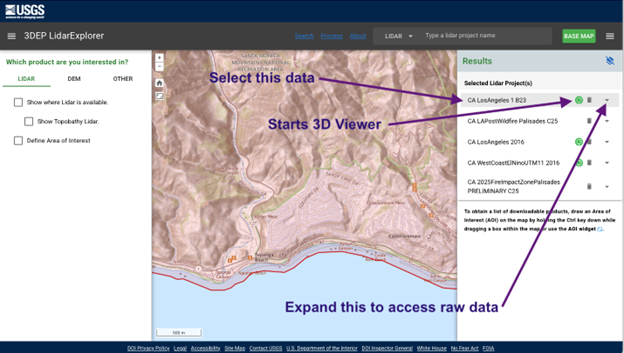
Above: how to access Sunset Mesa LiDAR data and view in 3-D from NationalMap.gov
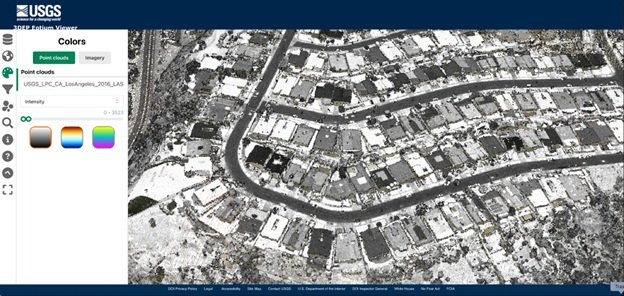
Using the 3DEP viewer, the neighborhood will look familiar if you select the “intensity” and grayscale options on the Color tab. This will reveal recognizable contrast, such as darker vs lighter roofs, all derived from LiDAR laser generated point cloud data.
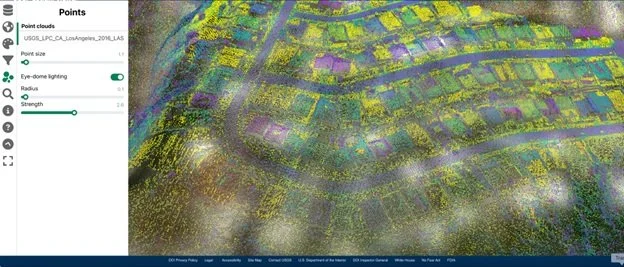
To view individual points more clearly, switch from grayscale to a color gradient, then on the Points tab, reduce the point size until you see individual dots.
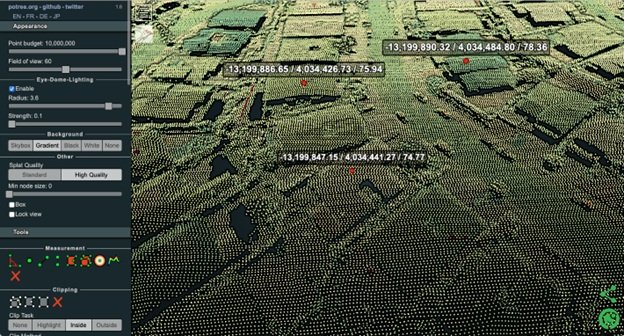
Using POTREE or other software, measuring elevations is as simple as selecting a surface point and checking its embedded elevation value. For example, selecting points along the ridgeline of a rooftop or points along the ground plane will reveal the elevation at those points. To spot check elevation data using the free POTREE viewer. Zoom in close, select the single point Measurement too (the single green dot icon), and run your mouse pointer over the surface points you want to measure to see the embedded metadata (X/Y positional coordinates then elevation) in meters. See metadata displayed from 3 points selected in the above example.
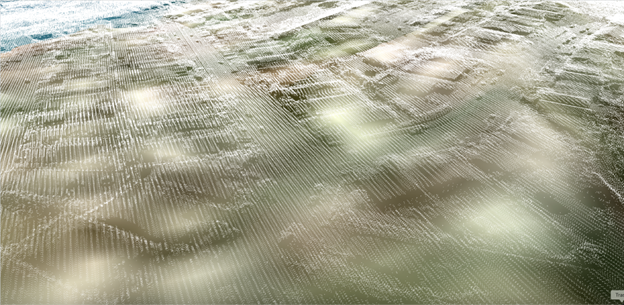
Above you can see up to 12 million points measuring precise elevation data throughout our neighborhood. Extracting elevation information does not require separate measurement steps because elevation data is already embedded into each and every point in the LiDAR point cloud when it was originally captured. Points are generated wherever a LiDAR laser reflects off the surface of an object or the ground, capturing the elevation of that surface with a high degree of precision.